
照片、PDF、证件照和社交媒体免费在线工具
55 多款快速、私密的工具集中在一处:压缩和调整图片尺寸、制作 30 多个国家的护照和签证照片、合并和压缩 PDF、制作 Instagram 字体和帖子,以及日常计算——直接在浏览器中完成,手机电脑均可使用。
Compress to 50 KB证件照Instagram fontsMerge PDF压缩 PDFJPG to PDFBulk crop sheet
No tool matches that search. Browse all tools or suggest one.
照片、护照与证件 14
PDF 与文档 9
社交媒体与字体 10
打字、写作与学习 9
计算器与理财 13
小游戏 3
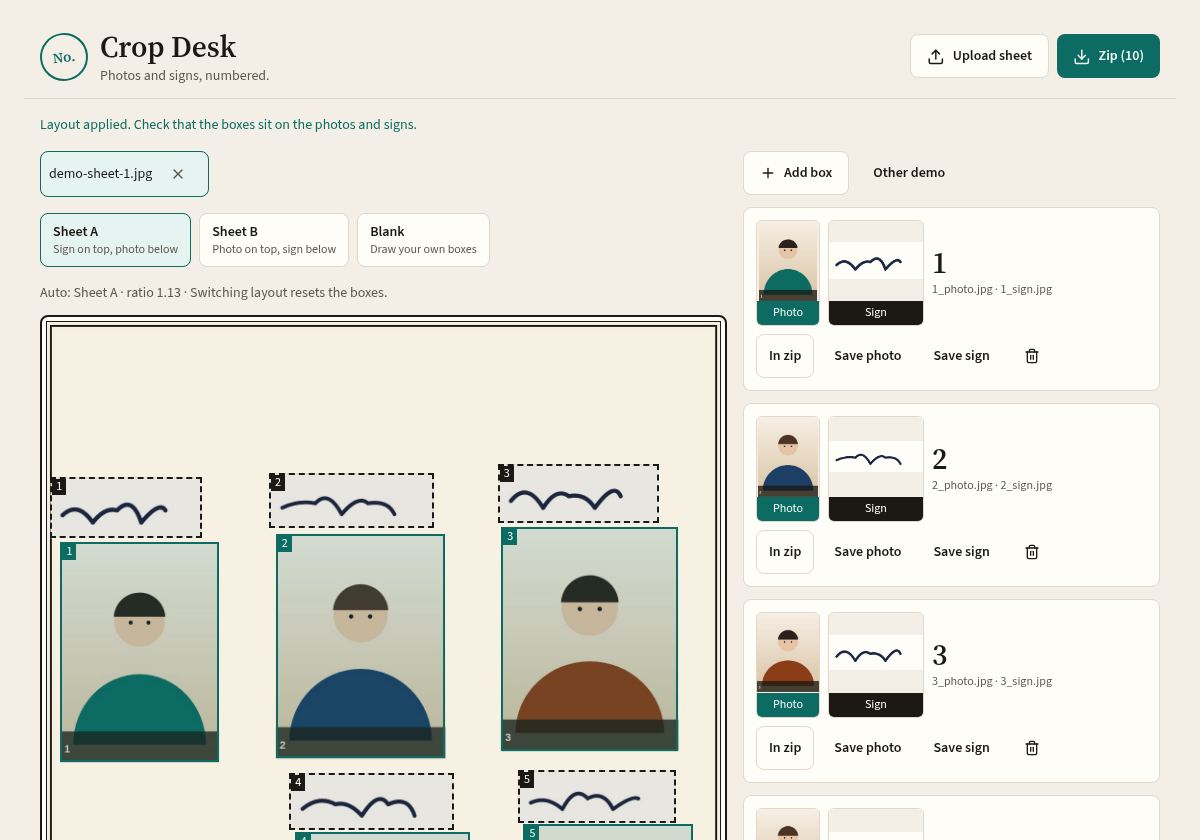
批量照片与签名裁剪
Scan one sheet with many people's photos and signatures. Crop Desk finds the boxes, cuts each one cleanly and gives you a ZIP of numbered files – 1_photo.jpg, 1_sign.jpg, 2_photo.jpg… Perfect for admission, exam and ID-card drives.
- Automatic box detection, or draw your own grid
- Save layouts for repeat sheets
- Works offline once loaded – nothing is uploaded
为什么大家选择 Crop Desk
🔒 隐私优先
Photos, signatures and PDFs are processed on your device. Why that matters.
⚡ 任何手机都很快
Lightweight pages that load quickly, even on slow mobile data.
🎯 结果精确
Hit precise KB limits, pixel sizes, DPI and official photo dimensions.
🆓 免费,无需注册
No watermark and no daily limit. An account is optional.
热门指南
US passport photo size: 2 × 2 inch rules
Exact size, head height, background and how to take one at home.
Read guide →Passport photo sizes by country
Size, head height and background for 30+ countries in one table.
Read guide →UK and Canada passport photo size
35 × 45 mm vs 50 × 70 mm, digital codes and head-size rules.
Read guide →Resize a photo to 50 KB or 100 KB
Shrink file size for uploads without making it blurry.
Read guide →Compress a PDF to 100 KB
Make scanned PDFs small enough for application portals.
Read guide →HEIC, JPG and PNG explained
Convert iPhone photos so websites accept them.
Read guide →常见问题
Crop Desk 免费吗?
是的。所有工具均免费使用,无需注册,无水印。网站通过广告支付托管费用。免费账户是可选的,仅用于在多台设备间保存您的作品。
我的照片和 PDF 会被上传吗?
不会。照片、签名和 PDF 工具完全在您的浏览器中运行,文件在您自己的手机或电脑上处理,不会发送到我们的服务器。
支持哪些护照和签证照片尺寸?
30 多种预设:美国(2x2 英寸、DS-160、DV 抽签)、英国、申根、德国、法国、加拿大、澳大利亚、印度、中国、日本、韩国、新加坡、土耳其等。申请前请务必核对官方要求。
如何把照片压缩到 20 KB、50 KB 或 100 KB?
打开图片压缩工具,选择照片并输入目标 KB 大小。工具会在限制内找到最佳画质,只有在必要时才缩小像素尺寸。
能从一张表格中裁剪多张照片和签名吗?
可以。批量裁剪工具会识别扫描表格上的方框,并将每张照片和签名保存为编号文件打包成一个 ZIP,非常适合学校、办公室和代办中心。
这些工具能在手机上使用吗?
可以。Crop Desk 以移动端优先设计,支持 Android、iPhone、平板和电脑上的 Chrome、Safari、Edge 和 Firefox。