Bulk photo & signature cropper for forms — free
Upload one sheet with many students' photos and signatures. Crop Desk finds the boxes, cuts each photo and sign, and gives you one ZIP: 1_photo.jpg, 1_sign.jpg, 2_photo.jpg…
Ek sheet upload kijiye, sabki photo aur sign alag-alag file mein – minutes mein.
- 🔒 Nothing uploaded
- 📱 Phone & computer
- 🗂️ Numbered ZIP
- 🆓 100% free
How it works — 3 steps
Teen aasaan steps: upload, box set karo, ZIP download.
- 1
Upload the sheet
A scan or a phone photo of your form sheet (JPG or PNG). Select several sheets at once if you like.
- 2
Check the boxes
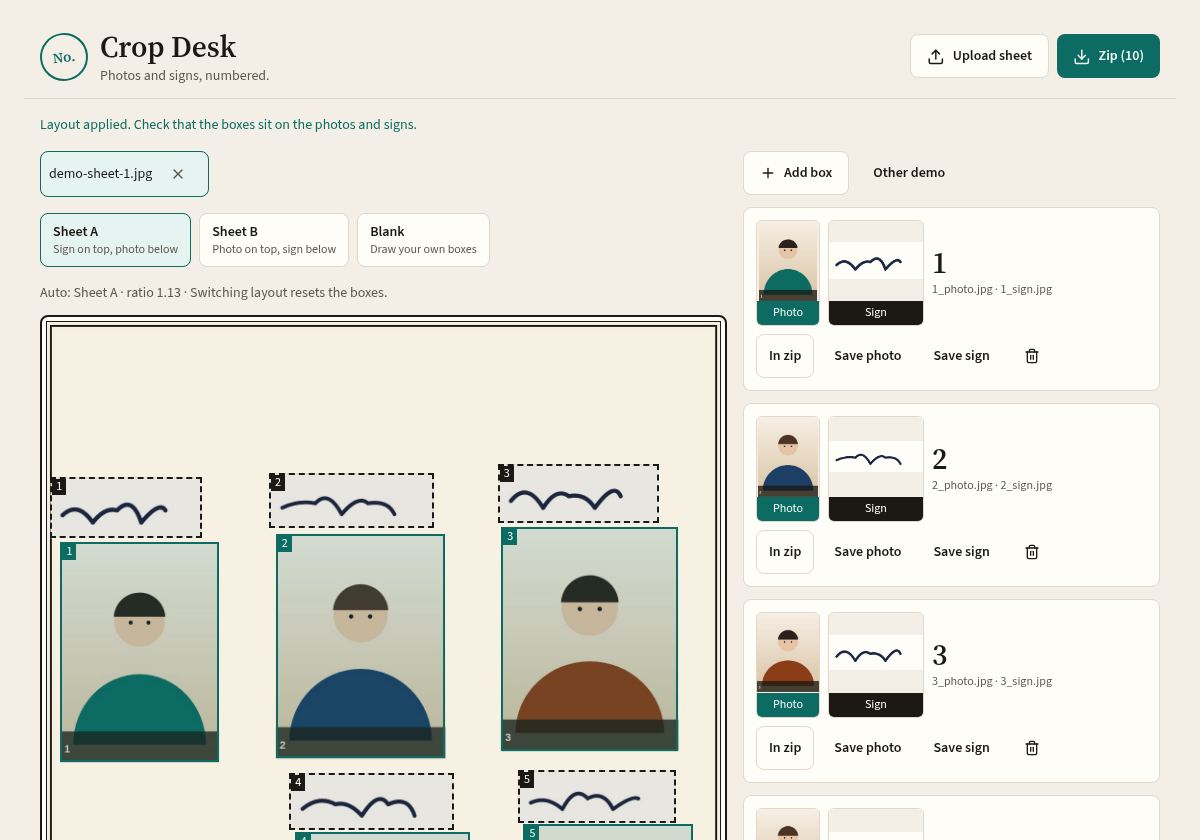
Layout is detected automatically. Green = photo, dashed = sign. Nudge all boxes or one box, make them smaller or larger.
- 3
Download the ZIP
Get every photo and sign as numbered JPG files in one ZIP – or save one person's files separately.
What you get
- 1_photo.jpg
- 1_sign.jpg
- 2_photo.jpg
- 2_sign.jpg
- 3_photo.jpg
- 3_sign.jpg
- …
Files follow the box order on the sheet, so number 7 is always the 7th student on your list.
Sheet layouts it understands
Sheet A
Signature on top, photo below. Detected automatically.
Sheet B
Photo on top, signature below. Blank cells are skipped.
Any other form
Choose Blank: draw boxes, add a box, or build a grid. Save the layout to reuse next time.
Who uses Crop Desk
🏫 School offices
Board registration, admission and scholarship forms for a whole class from one sheet per section.
👩🏫 Class teachers
Collect photos and signatures on one page, get clean files for ID cards and records.
🖥️ Cyber cafe / e-Mitra / CSC operators
Fill many applicants' forms fast, with numbered files and no mix-ups.
🎓 Students & coaching centres
Group exam form drives, hostel and college admissions, batch registrations.
Why it's different
Private by design
Runs entirely in your browser. Student and customer photos never leave your device. Why that matters.
Built for bulk
Made for sheets with 5, 10 or 30 people – not one photo at a time.
Simple controls
Big buttons, arrow-key nudging, per-person save, and saved layouts for repeat sheets.
Frequently asked questions
Is Crop Desk really free?
Yes. Crop Desk is free to use, with no sign-up and no limit on the number of sheets. The website may show ads to cover hosting costs.
Are my photos uploaded anywhere?
No. Everything happens inside your browser on your own phone or computer. The sheet is opened in the page, cropped there, and the ZIP is created on your device. Photos are not sent to our server. Aapki photo aapke device se bahar nahi jaati.
Does it work on mobile?
Yes. Open the tool in Chrome or any modern browser on Android or iPhone, choose a photo of the sheet from your gallery or camera, and download the ZIP or single files.
What sheet layouts are supported?
Two common layouts are detected automatically: Sheet A (signature above the photo) and Sheet B (photo above the signature). For any other form, choose Blank and draw boxes, add boxes one by one, or build a grid. You can save a layout and reuse it.
How are the files named?
In box order: 1_photo.jpg, 1_sign.jpg, 2_photo.jpg, 2_sign.jpg and so on, inside one ZIP. Keep a numbered list of names so each number matches the right person. You can also save one person's photo or sign separately.
Will the files match my exam form's KB and pixel size?
Crop Desk cuts each photo and signature cleanly; it does not know the rules of your particular form. Check the official notification, then resize or compress if needed. Our guides on reducing photo size and resizing signatures explain how.
Can I process several sheets at once?
Yes. You can select several sheet photos together when uploading (JPG or PNG).
Is this an official government tool?
No. Crop Desk is an independent free tool and is not linked to any government department, board, university or exam body.
Helpful guides
How to Crop Many Students' Photos and Signatures from One Sheet
Cut every photo and signature from a group sheet in minutes, with numbered files.
Read →Photo and Signature Size for Online Exam Forms: A General Guide
Pixels, KB, JPG – what forms usually ask for and how to read the notification.
Read →How to Reduce Photo Size to 20–50 KB for Online Forms
Bring a photo into the KB range without making it blurry.
Read →How to Resize a Signature for Online Forms (Pixels and KB)
Make your signature the right pixel size and KB, still dark and readable.
Read →Passport Size Photo Dimensions in India (cm, mm, inches and Pixels)
3.5 × 4.5 cm vs 2 × 2 inch, and the pixel sizes for each.
Read →How to Scan Your Signature with a Phone (Clean, White Background)
Crisp signature on white paper using just your phone camera.
Read →